


Controlling The Solar Simulator With Solar Simulator Console
The Ossila Solar Simulator Console enables you to control and customize the output of your LED solar simulator. You can choose the overall power level or control each LED individually to tailor the output to your specific requirements. The user-friendly software can be installed on as many PCs as you want and you can access future updates for free.
Captions
- Use Sync button to find solar simulator.
- Turn off and on using switch.
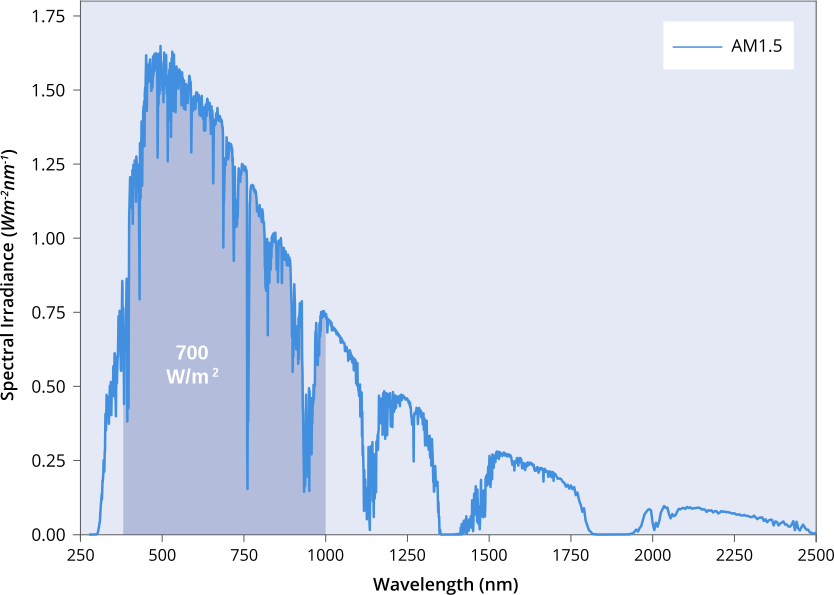
- Define 100 mW/cm2 for AM1.5G illumination.
- Control LED intensity individually with power level control.
- Use sliders to increase or decrease LED intensity.
- Select individual wavelengths.
- Define light intensity up to 1 Sun (0-100 mW/cm2)
Download our Solar Simulator Console Software
Indoor vs. Outdoor: Switch Between Calibrated Sources
Simply attach the indoor light filter to switch the Ossila LED Solar Simulator from 1 Sun output (defined by IEC 60904-9:2020 standards) for testing outdoor solar cells, to 1000 lx r 200 lx calibrated output (defined by IEC TS 62607-7-2:2023 standards). This recalibration will happen automatically.

Solar Simulator

More Resources
 What is Different About the Ossila LED Solar Simulator?
A solar simulator is an essential piece of equipment for any lab working with photovoltaics, optoelectronics, or any research that requires a simulated sunlight environment. They provide an accurate and repeatable source of light that is essential for conducting photovoltaic research. But how do you choose the right solar simulator?
Read more... Controlling The Solar Simulator With Solar Simulator Console
The Ossila Solar Simulator Console enables you to control and customize the output of your LED solar simulator. You can choose the overall power level or control each LED individually to tailor the output to your specific requirements. The user-friendly software can be installed on as many PCs as you want and you can access future updates for free.
Read more...